



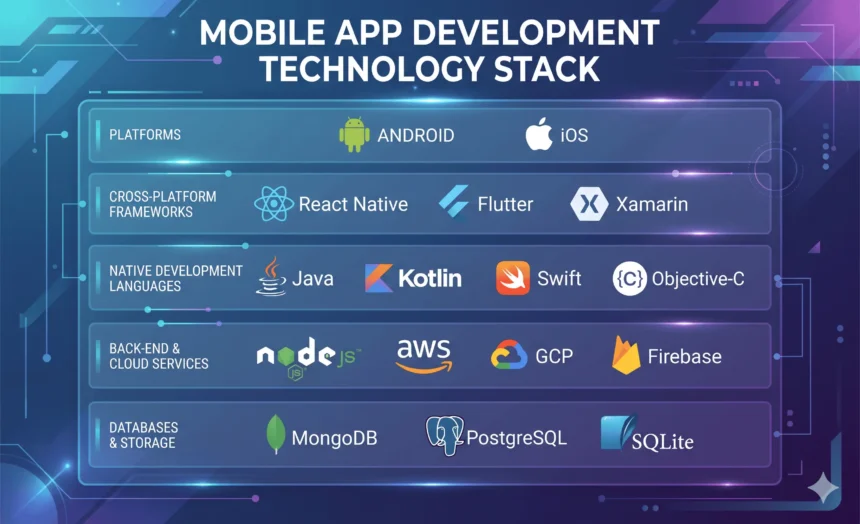
Choosing the right technology stack is an important step in building a successful mobile application. The right combination of programming languages, frameworks, development tools, and software development kits (SDKs) can help businesses manage development costs, improve performance, and simplify long-term maintenance.
However, no single technology stack is ideal for every project. Your choice should depend on your target audience, required features, budget, development timeline, security needs, and future growth plans.
Mobile App Development Technology Stack: A Complete Guide
In this guide, we explore the main mobile app development approaches, and the technologies businesses can consider in 2026.
Native Mobile App Development
Native mobile app development involves creating applications specifically for an operating system, such as iOS or Android. Developers use platform-specific programming languages, SDKs, development environments, and APIs to build applications that integrate closely with the operating system.
Native development is a strong choice for applications that require advanced device capabilities, sophisticated user interfaces, reliable performance, or deep integration with platform features.
iOS App Development Tech Stack
Apple provides a comprehensive set of tools for building applications for iPhone, iPad, Mac, Apple Watch, and other supported platforms. The following technologies form the foundation of modern iOS app development.
1. Swift and Objective-C
Swift is Apple’s modern programming language and the preferred starting point for most new iOS projects. It features concise syntax, strong type safety, and memory-safety mechanisms that help developers write maintainable code and catch certain errors early.
Objective-C remains relevant for maintaining existing applications, integrating older libraries, and working with established Apple-platform codebases. Developers can also combine Swift and Objective-C in the same project when necessary.
2. SwiftUI and UIKit
SwiftUI is Apple’s declarative framework for building user interfaces across its platforms. Developers describe how an interface should appear and respond to changes in application data, which can simplify UI development.
UIKit remains important for iOS applications that need established interface components, detailed control over the user experience, or compatibility with existing code. Teams can also use SwiftUI and UIKit together.
3. Xcode
Xcode is Apple’s official integrated development environment (IDE). It provides tools for writing code, designing interfaces, running simulators, debugging problems, testing applications, and preparing releases for the App Store.
Xcode also includes performance-analysis tools and support for source control, making it central to the development and maintenance of Apple-platform applications.
4. Apple SDKs and APIs
Apple’s SDKs provide the frameworks, libraries, and tools developers need to access operating-system capabilities. Depending on an application’s requirements, developers may use APIs for camera access, location services, notifications, authentication, payments, accessibility, and data storage.
The appropriate frameworks depend on the features being developed and the Apple platforms being supported.
Android App Development Tech Stack
Android applications run across a broad range of smartphones, tablets, wearables, and other compatible devices. Developers need a technology stack that supports different screen sizes, operating-system versions, device capabilities, and performance requirements.
1. Kotlin and Java
Kotlin is a leading choice for modern Android development. It offers concise syntax, null-safety features, and interoperability with Java, helping developers build and maintain Android applications efficiently.
Java remains widely used, particularly in existing applications and projects with established Java-based libraries or codebases. Both languages are supported by Android development tools.
2. Jetpack Compose and Android Views
Jetpack Compose is Android’s modern declarative UI toolkit. It enables developers to create interfaces using Kotlin and is a strong starting point for many new Android applications.
The traditional Android View system remains relevant for existing applications, specialized interface requirements, and projects that depend on established components. Developers can integrate Compose into applications that already use Views.
3. Android Studio
Android Studio is Google’s official IDE for Android application development. It includes a code editor, build tools, debugging capabilities, emulators, testing utilities, and performance-analysis features.
Developers can use Android Studio to build applications, identify errors, test across virtual and physical devices, and prepare production releases. Its tooling also supports Kotlin, Java, and native C/C++ development.
4. Android SDK and APIs
The Android SDK provides the platform libraries, development tools, and resources needed to build Android applications. Developers use the SDK to work with device features, system services, notifications, networking, storage, and other capabilities.
Teams must also configure appropriate Android SDK versions and test their applications against the Android versions and devices they intend to support.
Cross-Platform Mobile App Development
Cross-platform development allows teams to build applications for multiple operating systems while sharing a substantial portion of their codebase. It can reduce duplicated development work and make it easier to maintain consistent functionality across platforms.
However, the extent of code sharing varies by framework and project. Platform-specific interfaces, integrations, and device features may still require additional development.
Popular Cross-Platform Technologies
1. React Native
React Native is an open-source framework that enables developers to build Android and iOS applications using React and JavaScript or TypeScript.
Instead of simply displaying a website inside a mobile application, React Native uses native platform components for its user interface. Developers can share business logic and application code while adapting certain elements to the requirements of each platform.
React Native is worth considering for businesses that want to reuse JavaScript or React expertise and build mobile applications without maintaining two entirely separate codebases.
2. TypeScript
TypeScript extends JavaScript with static typing and additional development tools. It helps teams identify many coding errors before runtime and makes complex codebases easier to understand and maintain.
TypeScript is a strong choice for new React Native projects, particularly when several developers collaborate on an application or the project is expected to grow over time.
3. Flutter and Dart
Flutter is Google’s open-source framework for developing applications from a shared codebase. It uses Dart as its primary programming language and supports mobile development for Android and iOS, along with additional platforms.
Flutter provides its own UI framework and rendering capabilities, giving developers considerable control over interface design and visual consistency. Its built-in widgets can help teams create customized interfaces across different devices.
Flutter is a useful option for businesses that prioritize consistent branding, custom interfaces, and shared application development across platforms.
4. .NET MAUI and C#
.NET Multi-platform App UI (.NET MAUI) is Microsoft’s framework for building applications for Android, iOS, macOS, and Windows using C# and .NET.
It enables developers to share code and project resources across supported platforms while incorporating native platform functionality where required. It is particularly relevant to businesses that already use C#, .NET, and Microsoft development tools.
.NET MAUI is the appropriate modern option to evaluate for new .NET-based cross-platform projects rather than the discontinued Xamarin framework.
Hybrid Mobile App Development
Hybrid mobile app development uses web technologies such as HTML, CSS, and JavaScript or TypeScript to build application interfaces that run within a native mobile container.
This approach can be attractive to businesses that already have a web application or want to reuse existing web development expertise. However, hybrid applications may require additional optimization or native integrations when they rely heavily on graphics, complex animations, or demanding device features.
Popular Hybrid App Development Technologies
1. Ionic Framework
Ionic is a framework for building cross-platform application interfaces using familiar web technologies. Developers can work with supported web frameworks such as Angular, React, and Vue to create mobile-ready interfaces.
Ionic provides reusable UI components designed for mobile experiences. Its web-focused approach can help teams build applications for multiple platforms without creating every interface separately.
2. Capacitor
Capacitor is a cross-platform native runtime that enables web applications to run on iOS and Android and access supported native device features.
Through its plugin system, developers can integrate capabilities such as camera access, geolocation, and other platform APIs. Teams can also add custom native code when a required feature is not available through existing plugins.
Ionic and Capacitor work well together, although Capacitor can also be used with other modern web applications.
3. HTML, CSS, and JavaScript or TypeScript
These web technologies form the foundation of many hybrid applications. HTML structures the content, CSS controls presentation, and JavaScript or TypeScript handles application logic and interactions.
Developers can use existing web skills to build mobile interfaces and share parts of an application with a website or progressive web app. The degree of reuse depends on the application’s architecture and platform requirements.
4. Apache Cordova
Apache Cordova is another framework for packaging web-based applications for mobile platforms and accessing native functionality through plugins.
It remains relevant when maintaining existing Cordova applications or working with projects that depend on its ecosystem. For new projects, teams should compare its maintenance requirements and plugin compatibility with modern alternatives, including Capacitor.
Native vs. Cross-Platform vs. Hybrid App Development
The best approach depends on your application’s features, user expectations, development resources, and long-term maintenance needs.