


Working from home, catching up on emails in a coffee shop, or logging into a meeting while traveling might all be part of a normal working week for your employees. Remote and hybrid workers enjoy greater flexibility, allowing businesses to operate more efficiently, but this flexibility also introduces cybersecurity challenges that aren’t always easy to manage. When remote and hybrid workers access company systems from different locations, devices, and networks, how can you be sure your business is properly protected?
Luckily, keeping your remote and hybrid workers secure doesn’t have to be complicated. However, it does require you to rethink some of your existing security measures and make sure they’re suited to how your team actually works.
Understand the Risks of Working Outside the Office
When everyone worked from one location, protecting your business network was relatively straightforward. You could manage devices, monitor traffic, and implement security controls within a defined environment. With remote working, that level of control becomes harder to maintain.
Your employees might connect through unsecured public Wi-Fi, use personal devices to access business information, or unknowingly click on phishing links while working from home. Even something as simple as sharing a device with a family member could introduce unnecessary risks.
It’s important to understand how your employees work, where they’re accessing company resources, and which potential vulnerabilities need your attention.
Make Secure Access a Priority
One of the biggest challenges of remote working is making sure employees can access the systems they need without exposing your business to unnecessary threats. Traditional security approaches aren’t always designed to accommodate employees connecting from multiple locations.
This is where modern cloud-based security solutions can make a difference. For example, businesses looking to strengthen their protection can shop FireCloud at watchguardonline.co.uk, which offers cloud-delivered security capabilities designed for remote and hybrid workforces.
Solutions like WatchGuard FireCloud can help businesses manage secure internet access, apply consistent security policies, and introduce Zero Trust controls that verify access rather than automatically trusting users or devices.
By investing in the right technology, you can give employees the flexibility they need without compromising your security standards.
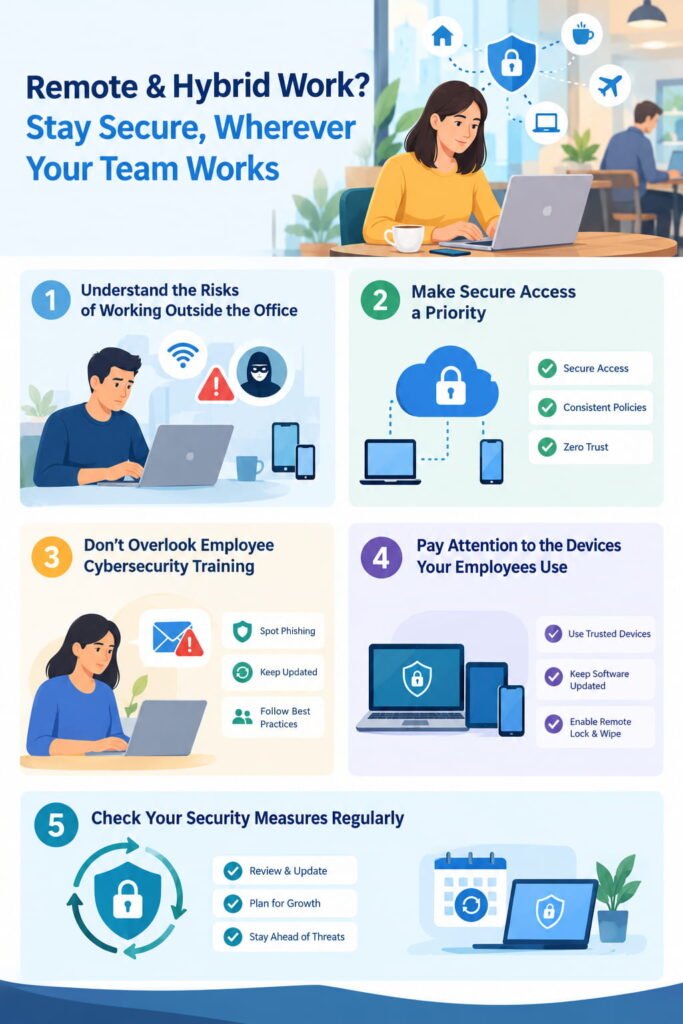
Don’t Overlook Employee Cybersecurity Training
You could have the most sophisticated cybersecurity systems in place, but your employees are still important when it comes to protecting your business. After all, it only takes one convincing phishing email or a weak password to create a potential security problem.
Make cybersecurity training a regular part of your business operations rather than something you cover during onboarding and never revisit. Help employees recognize suspicious emails, understand why software updates matter, and know what to do if they suspect something isn’t right.
Keep your guidance practical and relevant to everyday situations. Employees are more likely to follow security procedures when they understand how those measures protect both them and the wider business.
Pay Attention to the Devices Your Employees Use
Another area worth reviewing is device security. Are your employees using company-issued laptops, personal computers, or a combination of both? Do you know whether those devices have appropriate security software installed and are receiving regular updates?
Without clear device management policies, it’s easy for vulnerabilities to go unnoticed. Establish minimum security requirements, encourage automatic updates, and make sure lost or stolen company devices can be secured remotely wherever possible.
You should also consider how business information is stored and shared, particularly if employees regularly move between personal and professional devices.
Check Your Security Measures Regularly
Cybersecurity isn’t something you can address once and assume is taken care of forever. Your business will continue to evolve, new employees will join, and the threats targeting remote workers will change.
Make time to review your security arrangements regularly, particularly when introducing new applications, expanding your workforce, or changing how employees access company systems.
Remote and hybrid working can offer significant benefits for your business, but those advantages shouldn’t come at the expense of security. By combining appropriate technology, employee awareness, and ongoing monitoring, you can create a safer working environment wherever your team happens to be.
Also read: